
Windows XP gives you a number of options that can be displayed with a file.
For example, let’s say you are looking at a bunch of files in a folder. With the right configuration, you can see not only the names of the files, but also their size, type, who created them, and other details. You can easily determine what details you want to display for files in a folder.
To make changes to the details settings of files
For example, let’s say you are looking at a bunch of files in a folder. With the right configuration, you can see not only the names of the files, but also their size, type, who created them, and other details. You can easily determine what details you want to display for files in a folder.
To make changes to the details settings of files
- open the folder and click the View menu.
- Click--> the Choose Details option--> a Choose Details window appears
- Click the details you want presented with the file--> click OK.
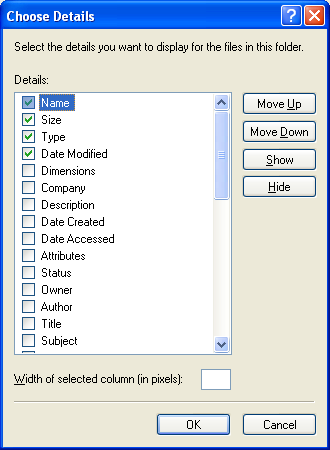
You can come back to this window and change the detail items you want to see at any time.


