To change the Start menu to the classic Start menu follow the below steps:
1. Right click on an empty space on the taskbar--> select properties
Or
Click Start--> Click Control Panel--> double-click Appearance and Themes.
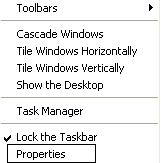
1. Right click on an empty space on the taskbar--> select properties
Or
Click Start--> Click Control Panel--> double-click Appearance and Themes.
